


Google Tuner: The Free Online Tool Every Musician Should Know
Google Tuner is one of the simplest yet most powerful online tools available for musicians today. Whether you are a beginner just learning to play your first chords or a casual guitarist looking to tune up before a jam session, this tool offers a fast, free, and reliable solution. It is all without the need to download anything.
In this guide, we’ll take a deeper look at how Google Tuner works, why it became so popular, and what makes it different from other tuning tools. You’ll also find insights into its accuracy, usability for different instruments, and why music teachers and students across the U.S. are using it regularly.
What is Google Tuner?
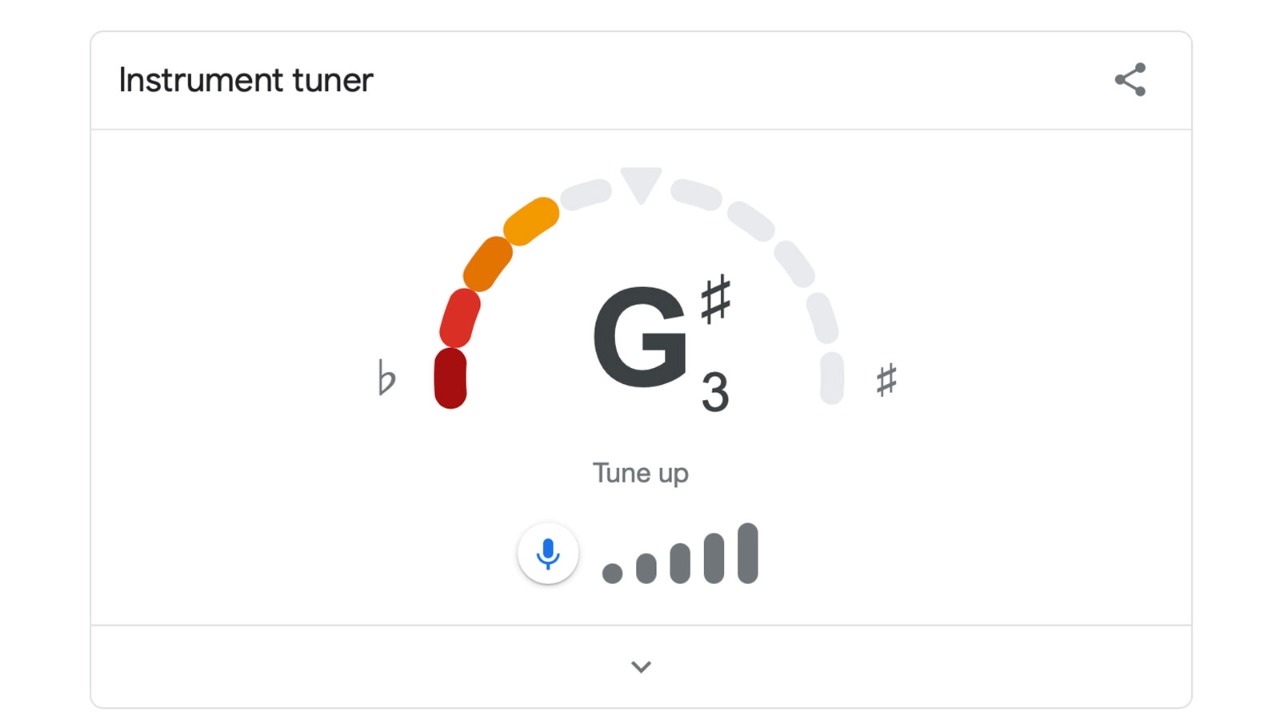
Google Tuner is a built-in feature of Google Search that allows users to tune musical instruments directly through their device’s microphone. There’s no app to install or software to set up. All you need to do is open a web browser, search for "Google Tuner," and start tuning.
The tuner works by listening to the sound you play. When you pluck a string or play a note, the tuner analyzes the frequency and tells you whether it’s too high (sharp), too low (flat), or perfectly in tune. This kind of tool is known as a chromatic tuner, which means it can recognize all musical notes, not just specific strings.
The best part is that it's 100% free and available instantly. It works on most modern devices, including smartphones, laptops, tablets, and desktops, as long as the device has a microphone.
How Google Tuner Works
The process behind Google Tuner is simple but smart. When you play a note, your microphone picks up the sound and sends it to the browser. Google then uses digital signal processing to measure the frequency of the note in real-time.
For example, if you're tuning a guitar and you play the low E string, the tuner will compare the frequency it hears with the ideal frequency for that note, which is around 82.41 Hz. If the note is too low, the tuner will tell you to tighten the string. If it’s too high, it will tell you to loosen it. When the pitch matches perfectly, the display will show that the note is in tune.
This system is incredibly helpful because it allows beginners to tune by sight as well as sound. The on-screen interface is visual and friendly, with clear labels that are easy to follow.
No Downloads or Logins, Just Tune and Play
One of the biggest reasons for Google Tuner’s popularity is how accessible it is. There are many tuning apps available today, but most of them require users to download the app, sign up for an account, or pay for premium features. Some even contain ads or hidden costs.
Google Tuner removes all these steps. There’s no need to register, no annoying pop-ups, and no storage space needed on your phone. All you do is search for it, and it’s ready to go.
This is especially useful for students, travelers, and casual musicians who may not always have access to their usual tuning tools. As long as you have an internet connection, you can use Google Tuner in seconds.
Instruments Supported by Google Tuner
While Google Tuner is often used for tuning guitars, it’s not limited to only one instrument. Because it is a chromatic tuner, it can detect and analyze any note played by most instruments. This means you can use it to tune a wide variety of instruments, including.
-
Acoustic and electric guitars
-
Ukuleles
-
Violins and violas
-
Bass guitars
-
Mandolins
-
Wind instruments (for pitch checking)
-
Even your voice, if you want to test your pitch as a singer
Because of this wide range of applications, Google Tuner is becoming a favorite among both instrument players and vocalists alike. As long as the note is clear and there’s minimal background noise, the tuner will do a good job detecting it.
Google Tuner in Music Classrooms
Across the United States, many music teachers are now encouraging students to use Google Tuner. Since it works directly in the browser, it’s perfect for school-issued Chromebooks or shared computer labs.
Instruments going out of tune is a common problem in school settings. By introducing students to Google Tuner, teachers can save time and help students become more independent. Tuning becomes part of the learning process rather than a hurdle.
In addition, because there’s no installation or cost, schools don’t have to worry about tech support or budgeting for extra software.
Is Google Tuner Accurate?
This is one of the most important questions for any tuning tool. The answer is yes. For everyday use, Google Tuner is very accurate.
It may not be as precise as a professional-grade tuner designed for studio musicians, but it offers more than enough accuracy for home practice, school use, and live play. In a quiet environment with a decent microphone, the pitch detection is reliable and consistent.
However, if you're performing in a concert, recording in a studio, or playing with alternate tunings, a dedicated hardware tuner or advanced app may give you more control. But for most people, especially beginners and intermediate players, Google Tuner gets the job done very well.
Common Problems and Fixes
Like any digital tool, Google Tuner might face issues in certain situations. The most common one is background noise. If you’re trying to tune in a noisy environment, the tuner might pick up unwanted sounds, leading to inaccurate readings.
Another issue might be microphone permissions. If your browser doesn't have access to your microphone, the tuner won’t work. To fix this, go to your browser settings and make sure microphone access is allowed for Google.
Lastly, if your instrument is way out of tune, the tuner might not recognize the note correctly. In such cases, try getting the pitch closer manually first, then fine-tune with Google Tuner.
Why Choose Google Tuner Over Traditional Tuning Apps?
While there are many apps and physical tuners out there, Google Tuner stands out for its convenience. You don’t need to scroll through menus, create a profile, or wait for an app to update. It just works.
In addition, it saves time when switching between devices. If you’re practicing on your laptop one day and your phone the next, Google Tuner is there for you on both. The consistent interface and functionality make it a dependable choice.
For people who are just starting their musical journey, this level of simplicity makes the learning process less frustrating and more enjoyable.
Final Thoughts
Google Tuner is more than just a search engine trick; it’s a real tool that can help thousands of musicians keep their instruments in tune, no matter where they are. Its strength lies in its simplicity, speed, and accessibility. For anyone looking to tune a guitar, violin, or other instrument without hassle, it’s one of the best free tools available online today.
If you haven’t tried it yet, just open your browser, search for “Google Tuner,” and see how easy it is to use. Whether you’re practicing at home, preparing for a school recital, or teaching others how to play, it’s a modern tool that fits perfectly into the world of digital music education.
For the latest on international cooperation, don’t miss how UAE and Pakistan strengthened ties through new visa exemption agreements. Read full details on The Current.
'%3e%3crect%20y='0.445312'%20width='48'%20height='48'%20rx='24'%20fill='white'%20fill-opacity='0.5'/%3e%3crect%20x='0.5'%20y='0.945312'%20width='47'%20height='47'%20rx='23.5'%20stroke='%23808080'/%3e%3cpath%20d='M34.625%2024.4453L14%2024.4453'%20stroke='%23808080'%20stroke-width='0.920053'/%3e%3cpath%20d='M23.375%2034.4453L13.375%2024.4453L23.375%2014.4453'%20stroke='%23808080'%20stroke-width='0.920053'/%3e%3c/g%3e%3cdefs%3e%3cfilter%20id='filter0_b_489_44344'%20x='-12'%20y='-11.5547'%20width='72'%20height='72'%20filterUnits='userSpaceOnUse'%20color-interpolation-filters='sRGB'%3e%3cfeFlood%20flood-opacity='0'%20result='BackgroundImageFix'/%3e%3cfeGaussianBlur%20in='BackgroundImageFix'%20stdDeviation='6'/%3e%3cfeComposite%20in2='SourceAlpha'%20operator='in'%20result='effect1_backgroundBlur_489_44344'/%3e%3cfeBlend%20mode='normal'%20in='SourceGraphic'%20in2='effect1_backgroundBlur_489_44344'%20result='shape'/%3e%3c/filter%3e%3c/defs%3e%3c/svg%3e)
'%3e%3crect%20y='0.445312'%20width='48'%20height='48'%20rx='24'%20fill='white'%20fill-opacity='0.5'/%3e%3crect%20x='0.5'%20y='0.945312'%20width='47'%20height='47'%20rx='23.5'%20stroke='%23808080'/%3e%3cpath%20d='M13.375%2024.4453L34%2024.4453'%20stroke='%23808080'%20stroke-width='0.920053'/%3e%3cpath%20d='M24.625%2014.4453L34.625%2024.4453L24.625%2034.4453'%20stroke='%23808080'%20stroke-width='0.920053'/%3e%3c/g%3e%3cdefs%3e%3cfilter%20id='filter0_b_489_44344'%20x='-12'%20y='-11.5547'%20width='72'%20height='72'%20filterUnits='userSpaceOnUse'%20color-interpolation-filters='sRGB'%3e%3cfeFlood%20flood-opacity='0'%20result='BackgroundImageFix'/%3e%3cfeGaussianBlur%20in='BackgroundImageFix'%20stdDeviation='6'/%3e%3cfeComposite%20in2='SourceAlpha'%20operator='in'%20result='effect1_backgroundBlur_489_44344'/%3e%3cfeBlend%20mode='normal'%20in='SourceGraphic'%20in2='effect1_backgroundBlur_489_44344'%20result='shape'/%3e%3c/filter%3e%3c/defs%3e%3c/svg%3e)